


Угадайте по видео, что будет дальше. Проект доступен по адресу: http://whn.hopto.org/




- Python 3.7
- Django 3.2
- PostgreSQL
- Nginx
- Gunicorn
- Docker, Docker Hub
- GitHubActions(CI/CD)
- JS & jQuery
git clone https://github.com/team-yandex/team-project.gitWindows:
python -m venv venvMac, Linux:
python3 -m venv venvWindows:
.\venv\Scripts\activate.batMac, Linux:
source venv/bin/activateGo to requirements:
cd requirements- master - to run server:
pip install -r requirements-prod.txt - additional - for test:
pip install -r requirements-test.txt - additional - for development:
pip install -r requirements-dev.txt
Also you need Redis on your machine to run project: Install Redis
For example, in Arch Linux:
sudo pacman -S redis
sudo systemctl enable --now redis.serviceYou should use dotenv to configure settings. Example:
SECRET_KEY = VERYSECRETKEY
DEBUG = false
ALLOWED_HOSTS = 192.168.0.21,192.168.0.1
You can use example dotenv:
cp example.env .envYou have to migrate your database:
python whn/manage.py migrateTo add data and videos go to Initdata section
cd whnWindows:
python manage.py runserverMac, Linux:
python3 manage.py runserver- Установите Docker.
- (Далее) Установите драйвер psycopg2-binary внутри контейнера (Для Postgres)
Параметры запуска описаны в файлах docker-compose.yml и nginx.conf которые находятся в директории infra/
- Запустите docker compose:
docker-compose up -d --buildПосле сборки появляются 3 контейнера:
- контейнер базы данных db
- контейнер приложения backend
- контейнер web-сервера nginx
docker-compose exec backend python manage.py migrate- Запустите процесс загрузки ингредиентов:
docker-compose exec backend python manage.py load_ingrs- Запустите процесс загрузки тегов:
docker-compose exec backend python manage.py load_tags- Создайте суперпользователя:
docker-compose exec backend python manage.py createsuperuser- Запустите процесс сбора статики:
docker-compose exec backend python manage.py collectstatic --no-input- Не забудьте запустить сервер с параметром --settings=whn.settings_prod
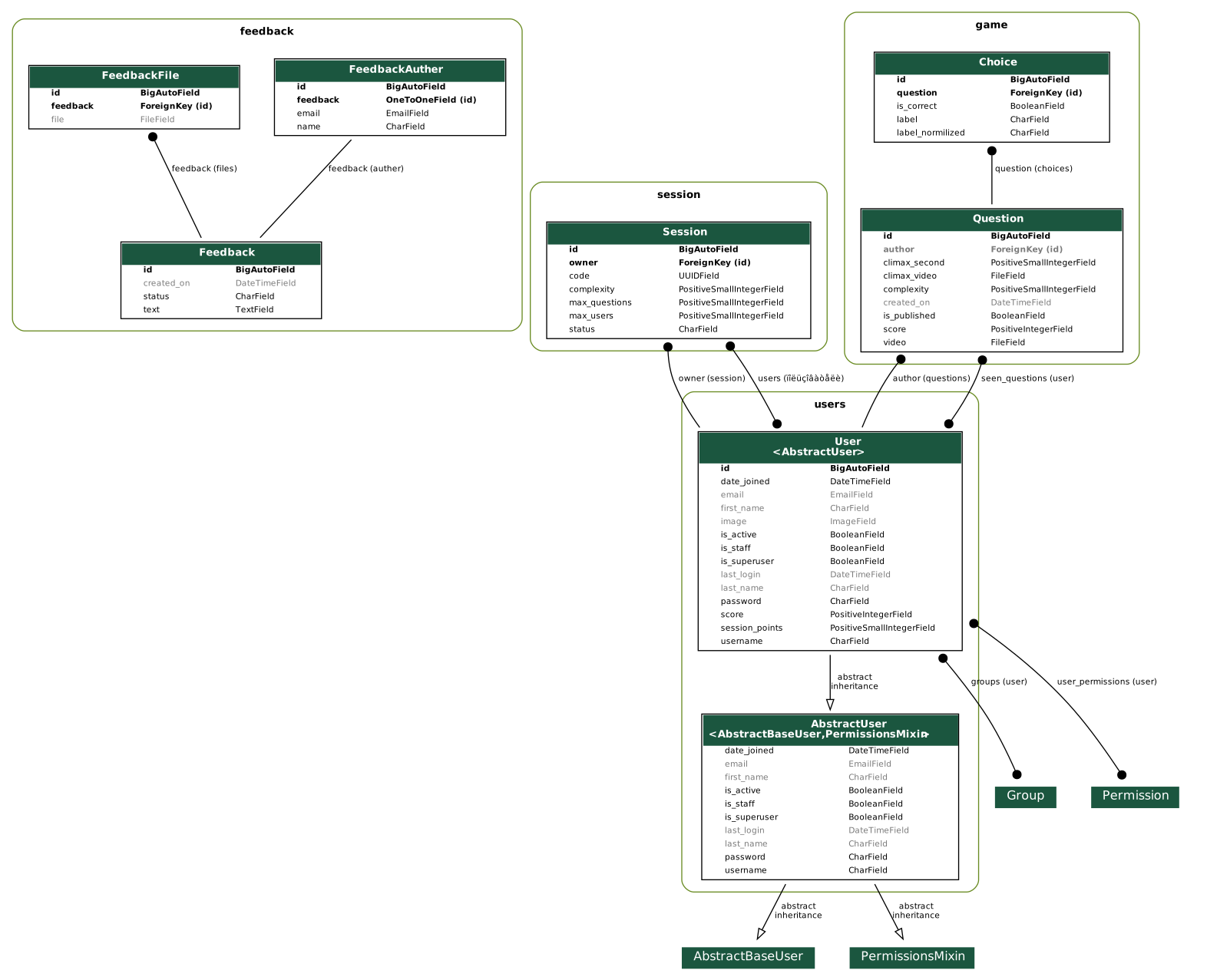
Django documentation
If you want to populate your fresh db with fixtures and superuser creditinals you can use
Windows:
cd whn
python manage.py initdata
Mac, Linux:
cd whn
python3 manage.py initdata
This command will check migrations and if there are pending ones you can apply them in place.
After that command will create superuser with creditinals defined in enviroment variables like
DJANGO_SUPERUSER_USERNAME = admin
DJANGO_SUPERUSER_EMAIL = admin@email.com
DJANGO_SUPERUSER_PASSWORD = superuserpassword
You could input all your creditinal from stdin if you haven't specified settings in enviroment variables.
You should define enviroment variable for app containing models:
GRAPH_APPS=core,feedback,game,info,users
After you sould run:
python manage.py graph_models -o <filename>.<image extension>
For example: python manage.py graph_models -o erd.svg
For more info look at django extension documentation