Add snap-layouts support to the Terminal #11680
Conversation


… case, but otherwize :primo:
… moving the mouse fast still leaves them hovered.
…ht. Just TME_LEAVE did not work, it would send the leave when really it should have been sending hovers
 ghost
added
Area-UserInterface
ghost
added
Area-UserInterface

This comment has been minimized.
This comment has been minimized.
This comment has been minimized.
This comment has been minimized.
This comment has been minimized.
This comment has been minimized.

Oh man am I excited. |
This comment has been minimized.
This comment has been minimized.

 miniksa
left a comment
miniksa
left a comment
miniksa
left a comment
There was a problem hiding this comment.
Does Alt+Space also still work for the system menu? This was only positioning for mouse events right? I don't think the mouse-variant of the system menu in the top left ever worked for us (though we could make it work maybe by returning HTSYSMENU, eh?

|
This is also going out in a selfhost build this evening. 😄 |
 zadjii-msft
added
the
AutoMerge
zadjii-msft
added
the
AutoMerge

|
Hello @zadjii-msft! Because this pull request has the p.s. you can customize the way I help with merging this pull request, such as holding this pull request until a specific person approves. Simply @mention me (
|
|
Alright, I've only caught one issue with this and that's: when you click down on close, move to maximize, then release, it performs maximize instead of sinking the event. |
|
before you merge this, drive those todos to 0 and delete them? 😄 |

| <data name="WindowCloseButton.[using:Windows.UI.Xaml.Automation]AutomationProperties.Name" xml:space="preserve"> | ||
| <value>Close</value> | ||
| </data> | ||
| <data name="WindowCloseButton.[using:Windows.UI.Xaml.Controls]ToolTipService.ToolTip" xml:space="preserve"> |

There was a problem hiding this comment.
too bad we can't reuse the existing tooltip machinery
 DHowett
removed
the
AutoMerge
DHowett
removed
the
AutoMerge
This is why I didn't hit approve here... waiting for Mike's input EDIT: wait nvm Dustin killed automerge... clicking.... |
|
Moved from body:
|
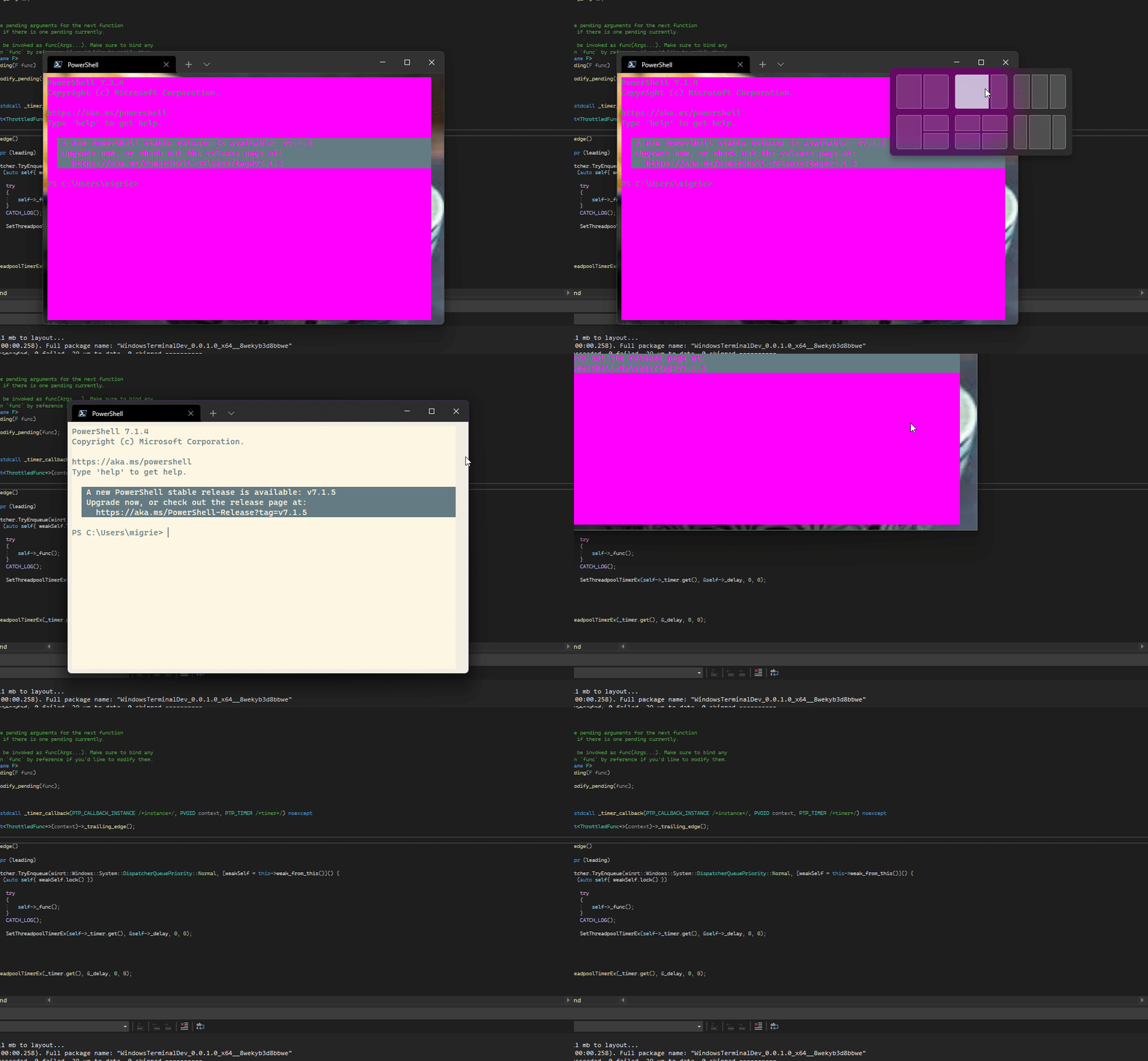 zadjii-msft
added
the
AutoMerge
zadjii-msft
added
the
AutoMerge
 ghost
merged commit
ghost
merged commit Adds snap layout support to the Terminal's maximize button. This PR is full of BODGY, so brace yourselves. Big thanks to Chris Swan in #11134 for building the prototype. I don't believe this solves #8795, because XAML islands can't get nchittest messages - The window procedure for the drag bar forwards clicks on its client area to its parent as non-client clicks. - BODGY: It also _manually_ handles the caption buttons. They exist in the titlebar, and work reasonably well with just XAML, if the drag bar isn't covering them. - However, to get snap layout support, we need to actually return `HTMAXBUTTON` where the maximize button is. If the drag bar doesn't cover the caption buttons, then the core input site (which takes up the entirety of the XAML island) will steal the `WM_NCHITTEST` before we get a chance to handle it. - So, the drag bar covers the caption buttons, and manually handles hovering and pressing them when needed. This gives the impression that they're getting input as they normally would, even if they're not _really_ getting input via XAML. - We also need to manually display the button tooltips now, because XAML doesn't know when they've been hovered for long enough. Hence, the `_displayToolTip` `ThrottledFuncTrailing` ## Validation Minimized, maximized, restored down, hovered the buttons slowly, moved the mouse over them quickly, they feel the same as before. But now with snap layouts appearing. ## TODO! * [x] I'm working on getting the ToolTips on the caption buttons back. Alas, I needed a demo of this _today_, so I'll fix that tomorrow morning. * [x] mild concern: I should probably test Win 10 to make sure there wasn't weird changes to the message loop in win11 that means this is broken on win10. * [x] I think I used the wrong issue number for tons of my comments throughout this PR. Double check that. Should be #9443, not #9447. Closes #9443 I thought this took care of #8587 ~as a bonus, because I was here, and the fix is _now_ trivial~, but looking at the latest commit that regressed. Co-authored-by: Chris Swan <[email protected]> (cherry picked from commit f2ebb21)
|
🎉 Handy links: |


|
If anyone is interested, snap layouts does not work in flutter desktop apps if title bar is customized/disabled: |


Adds snap layout support to the Terminal's maximize button. This PR is
full of BODGY, so brace yourselves.
Big thanks to Chris Swan in #11134 for building the prototype.
I don't believe this solves #8795, because XAML islands can't get
nchittest messages
area to its parent as non-client clicks.
the titlebar, and work reasonably well with just XAML, if the drag bar
isn't covering them.
HTMAXBUTTONwhere the maximize button is. If the drag bar doesn'tcover the caption buttons, then the core input site (which takes up
the entirety of the XAML island) will steal the
WM_NCHITTESTbeforewe get a chance to handle it.
hovering and pressing them when needed. This gives the impression that
they're getting input as they normally would, even if they're not
really getting input via XAML.
doesn't know when they've been hovered for long enough. Hence, the
_displayToolTipThrottledFuncTrailingValidation
Minimized, maximized, restored down, hovered the buttons slowly, moved
the mouse over them quickly, they feel the same as before. But now with
snap layouts appearing.
TODO!
Closes #9443
I thought this took care of #8587
as a bonus, because I was here, and the fix is now trivial, but looking at the latest commit that regressed.Co-authored-by: Chris Swan [email protected]