Interactive Rebase elements overlap when using keyboard and mouse navigation simultaneously #4816


Description

Precondition
Repository with multiple branches containing commits to rebase with --update-refs
Steps to Reproduce:
Step 1 [Pending]
- Create branch structure: main → feature-a (3 commits) → feature-b (2 commits)
- Checkout feature-b
- Execute: git rebase -i --update-refs main
- GitLens Interactive Rebase Editor opens
- Inspect the rebase list
Expected Result
- All commits from feature-a and feature-b are visible
- update-ref refs/heads/feature-a line displayed between feature-a and feature-b commits
- Line shows proper visual indicator (not a commit entry)
- No UI duplication or freezing
- Keyboard navigation works correctly through all entries including update-ref lines
Actual Result
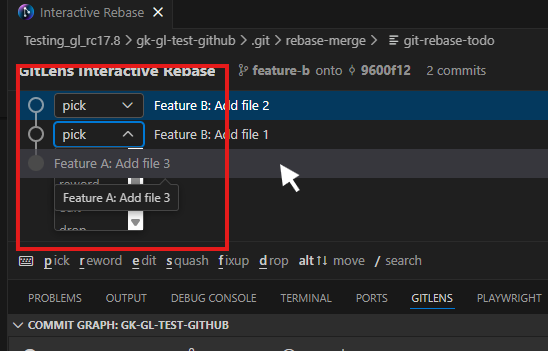
- Elements overlap when the mouse cursor hovers over a line while simultaneously opening the action dropdown via the Tab key on the keyboard:
Gitlens Version
Pre-release 2025.12.1604
VSCode Version
Version: 1.107.0 (user setup)
Commit: 618725e67565b290ba4da6fe2d29f8fa1d4e3622
Date: 2025-12-10T07:43:47.883Z
Electron: 39.2.3
ElectronBuildId: 12895514
Chromium: 142.0.7444.175
Node.js: 22.21.1
V8: 14.2.231.21-electron.0
OS: Windows_NT x64 10.0.26200