ARROW-1257: Plasma documentation #881
Conversation


python/doc/source/plasma.rst
Outdated
There was a problem hiding this comment.
Ideally we would use get_record_batch_size here, but it doesn't account for the metadata.

 wesm
left a comment
wesm
left a comment
wesm
left a comment
There was a problem hiding this comment.
Will have to look through the rest in more detail later
python/doc/source/plasma.rst
Outdated
There was a problem hiding this comment.
Seems like we might merge these with the more general build instructions? Though I suspect that most users will obtain the plasma client via pip or conda packages

|
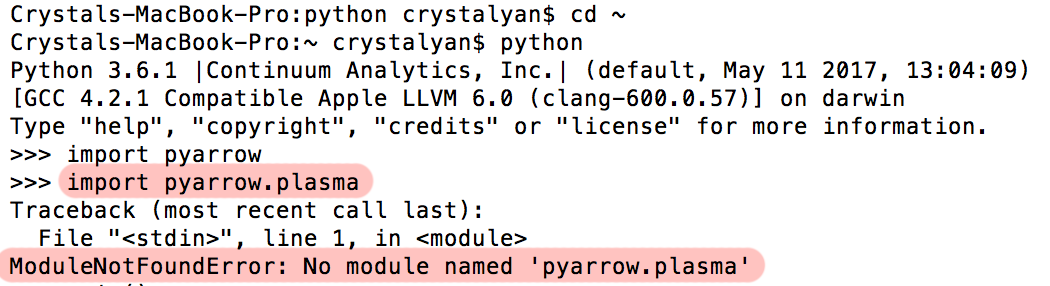
Hey Philipp, Five things came up when I was reviewing plasma.rst (the plasma python tutorial): Mac OS X Installation Instructions Don't Work For Me... I still don't know what's wrong with my mac, but trying to follow the installation instructions for plasma still don't work. I get this error when trying to import plasma:
I've tried the installation instructions with both your pcmoritz/arrow plasma-cython branch, and the actual apache/arrow repo, I did update my dependency packages, but this still happens. Did something go wrong in the install pyarrow + plasma step? Also, there's a paragraph in the Mac OS X Installation Instructions I had left which goes something like:
This was honestly more of a note to myself than anything, so I'm not sure if this paragraph is still necessary (it might confuse users). Does PlasmaClient.get Take in only Lists?I noticed that in the tutorial, all calls made to PlasmaClient.get seem to require list brackets for the argument and return result:
It's a little unexpected, but this is how the method's syntax behaves, correct? If so, we could maybe add a sentence in the Getting an Object section that the PlasmaClient.get method only takes in/outputs lists. (in contrast to Ray.get). Also, if it's like
Reword the Timeout ExplanationUnder the Getting an Object section, you included a mention of the
These last two sentences are very brief and do not show a code example of the syntax of passing timeout_ms argument, which I would suggest to add as a comparison to a normal call to Also, I'll mention that I actually found these two sentences confusing at first, since the word We could instead do something like:
Pandas Reference Link BrokenIn the Storing Pandas DataFrames in Plasma section, I had originally included an rst link to the Using PyArrow with Pandas page of the arrow documentation. This was to let users know that they could check out the conversion charts between pandas and Arrow:
However, this Include One-Liners for Converting Plasma Objects Back to Arrow/PandasThis is just an idea for the sake of convenience, but after we explain the users the conversion steps for PlasmaBuffer -> Arrow reader -> Arrow tensor -> numpy array in Getting Arrow Objects from Plasma (similarly, PlasmaBuffer -> Arrow BufferReader -> Arrow RecordBatchStreamReader -> Arrow RecordBatch -> Pandas DataFrame in Getting Pandas DataFrames from Plasma), we could also provide an equivalent condensed one-liner for the code example. This is so to show that all the conversion steps aren't really that intimidating or difficult: For Arrow:
For Pandas:
|

…allation for mac incomplete
…ontents header at top, minor tweaks to Linux Installation section. Still need to do Installation on Mac OS and storing Arrow/Panda in Plasma
…t to 'Getting an Object' subsection in Plasma API.
…for Starting the Object Store, Creating Clients, Creating Objects, Getting Objects, Transferring to Remote Stores, Querying Status, Releasing Objects, and Shutting Down Clients and Stores. Basically all of the PlasmaClient API. Warning- I could not get C++ running on my machine to verify that any of the code runs properly/works. Please verify all code and tutorial content


|
I pushed a few small changes. This looks good to me, nice job @crystalzyan :) |
 pcmoritz
changed the title
pcmoritz
changed the title

cpp/apidoc/tutorials/plasma.md
Outdated
| the Plasma store in this case, issue the command below: | ||
|
|
||
| ```shell | ||
| killall plasma_store & |

There was a problem hiding this comment.
Why is killall sent to the background?
cpp/apidoc/tutorials/plasma.md
Outdated
| Alternatively, you can run the Plasma store in the background and ignore all | ||
| message output with the following terminal command: | ||
|
|
||
| ```shell |
There was a problem hiding this comment.
Does using these annotations work in your doxygen version?

There was a problem hiding this comment.
The shell ones aren't obviously doing anything (want me to remove them?), but the cpp ones definitely help. Using doxygen 1.8.13.
I can remove the cpp ones also if you prefer.
There was a problem hiding this comment.
I just checked this out locally with doxygen 1.8.13. The rendered output looks OK, but it doesn't seem like shell is supported by the rendering engine (I tried tracking down where Doxygen's support for GH-flavored markdown is coming from but couldn't find anything conclusive).
The C++ looks good though so definitely leave that =)
There was a problem hiding this comment.
Ok, I removed the shell keyword.
 robertnishihara
force-pushed
the
plasma-docs
branch
from
robertnishihara
force-pushed
the
plasma-docs
branch
from
ec53098 to
c4ab47e
Compare

5 participants


Thanks a lot to @crystalzyan who did all the heavy lifting for this PR!